
Vibio: Share Fun, Video Chat
Akhisar Web TasarimLifestyle
4.868.00 Reviews
- Version
- 1.2.0
- Installs
- 50.00K
- Age Rating
- Teen
Screenshots


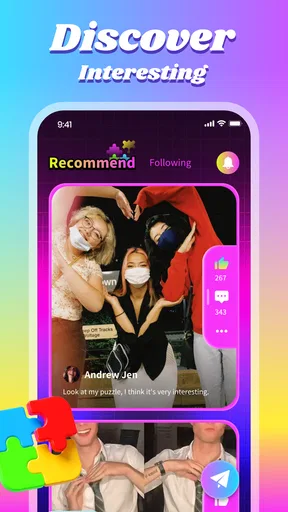


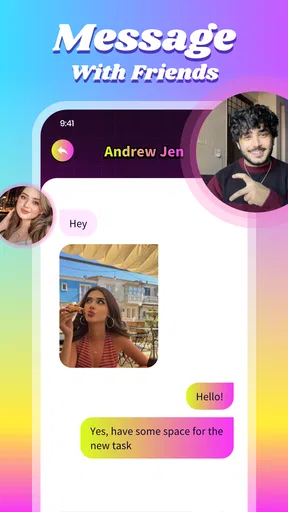
Our Review of Vibio: Share Fun, Video Chat
 Analysis by Appyee
If you’re looking for a fun way to meet new people and make connections around the world, let me introduce you to Vibio: Share Fun, Video Chat. This app is like having a mini party in your pocket, where you can jump into video chats and share moments with friends or strangers without the awkwardness of real-life meetups. Let's dive into what makes this app tick and why you might want to give it a shot.
Where Vibio fits into an everyday routine
I see Vibio as a better fit for someone who wants conversation to happen in real time than for someone who prefers to browse quietly and message at their own pace. A quick visit to a public room can suit a spare moment after work, while a private call makes more sense when you already have a person in mind. That distinction matters: video chat asks for attention, a suitable setting, and a willingness to respond, so it is not the kind of social app I would open while rushing between errands.
A realistic use might be checking in after dinner, joining a room around a topic you genuinely enjoy, and staying only while the conversation feels comfortable. I would treat the room as a starting point rather than expect every visit to turn into a lasting friendship. If you want a low-pressure first step, listening and observing the tone before joining in can help you decide whether a room suits you. For a more private conversation, I would move there only when both people are comfortable with that shift.
Choosing between rooms, calls, and familiar social apps
Compared with a conventional social network built around posts and profile browsing, Vibio puts more weight on live interaction. That can make meeting someone feel immediate, but it also means you have less time to consider a reply and may need to leave a conversation that is not working. Compared with a messaging app used mainly to keep up with people you already know, the public-room approach is more open-ended; it may help you encounter new voices, but it is less predictable than contacting a friend directly.
That trade-off is why I would not recommend replacing every social app with Vibio. It is most appealing when you have time and energy for spontaneous conversation. If you need dependable, scheduled communication with family or colleagues, a familiar calling or messaging service is usually the more practical choice. If you would rather communicate in writing or keep your camera off, a text-first community may suit you better.
Making live conversations more comfortable
For a smoother first visit, I would decide in advance what I am comfortable sharing and keep the conversation within those boundaries. A public room is not the same as a private space, even when the discussion feels friendly. Avoid sharing identifying or sensitive details with people you have just met, and leave or block an account if the interaction crosses a line. Reporting and blocking are useful controls, but they work best alongside sensible choices about what to reveal.
Virtual gifts can make a chat feel more playful, but I would treat them as optional rather than as a requirement for fitting in. Since the app includes in-app purchases, it is worth checking the purchase details before spending and deciding on a personal limit first. Someone who only wants to talk can focus on the conversation instead; a gift should never be the price of attention or a substitute for genuine interest.
For anyone under the app’s Teen content rating, I would also recommend using the privacy and contact controls thoughtfully and involving a trusted adult if an interaction feels uncomfortable. Live conversations can change direction quickly, and leaving a room is a perfectly reasonable response. This is a social space, not a guarantee that every stranger will be a good match.
Getting Started with Vibio
Installing Vibio: Share Fun, Video Chat is a breeze. A quick download from the App Store or Google Play, and you’re ready to roll. Setting up your profile is straightforward. You can use your email or social media accounts to sign up, and within minutes you’re part of a global community eager to connect.
The user interface is clean and intuitive, which I found refreshing. You’re greeted with a colorful home screen, filled with options to join public chatrooms or start private video calls. The design is user-friendly, so even if you’re not tech-savvy, you’ll find your way around without a hitch.
Connecting and Chatting
What really sets Vibio apart is its dynamic chat options. Whether you’re in the mood for a group chat or a one-on-one conversation, Vibio has got you covered. There are so many public chat rooms you can join based on your interests. Love cooking? There’s a room for that. Into gaming? Join the discussions with fellow gamers. It’s like having endless possibilities right at your fingertips.
One of the features I found particularly cool is the ability to send and receive virtual gifts. It’s a fun way to show appreciation during chats, and it adds a little more excitement to conversations. Plus, it’s a great icebreaker if you’re shy about starting a dialogue.
Safety and Privacy
Now, I know what you’re thinking: what about safety? Vibio takes this seriously. They have robust privacy settings that allow you to control who can contact you and what information is visible on your profile. You can also report or block users who are being inappropriate, which is a reassuring feature for anyone concerned about online safety.
The app also employs moderation to ensure that chatrooms remain a safe space for everyone. It’s clear that Vibio is committed to creating a friendly environment, which is something that definitely earns brownie points in my book.
Performance and Usability
Let’s talk about performance. During my time using Vibio, I didn’t experience any significant lag or crashes, which is always a plus. Video quality is decent, and the audio is clear, making it easy to have uninterrupted conversations. The app is regularly updated, which means bugs are promptly fixed, and new features are added, keeping the user experience fresh and engaging.
Video calls are naturally more demanding than reading or sending messages: they rely on a steady connection and keep the screen, camera, and audio in active use. I would start a call on a reliable connection, especially if I planned to stay for a while, and close it when I needed to save battery or mobile data. If a call becomes choppy, checking the connection and trying again later is more sensible than assuming the app itself is always at fault.
Another thing worth mentioning is the app’s battery usage. It’s surprisingly efficient, so you can enjoy lengthy chats without worrying about your phone dying on you. This is especially great for those who are always on the go and need their phone to last throughout the day.
For heavier use, I would be more cautious than I would be with a text-only app. Long video sessions can put a greater load on a phone than browsing messages, and the experience can vary with device condition, connection quality, and what else is running. If your battery is already low, or your device is warm from other tasks, a shorter call is the practical choice. I also would not count on uninterrupted conversation when moving between places with changing reception.
Why Vibio Stands Out
In a world filled with social apps, Vibio manages to stand out by focusing on fun and interaction. It’s not just about scrolling through profiles but actually engaging with people in real-time. The combination of video chat and virtual gifting creates a lively atmosphere that’s hard to resist.
Moreover, the diversity of chat rooms means there’s something for everyone, making it easy to find your tribe. Whether you’re looking to make new friends or just pass the time, Vibio offers a platform where you can do both.
Who is likely to enjoy it?
The clearest audience for Vibio is someone comfortable meeting people online, happy to speak spontaneously, and interested in both group conversation and one-to-one calls. The app is also a reasonable choice for people who want a more active alternative to scrolling through posts. If you are camera-shy, prefer carefully edited messages, or dislike unpredictable group dynamics, its central appeal may not match your habits.
On the practical side, Vibio is a free lifestyle app from Akhisar Web Tasarim, with optional in-app purchases. Its average rating is 4.8 from around 500 ratings, and it has passed 10,000 installs. Version 1.1.6 supports Android 6.0 and later, and its content rating is Teen. Those details make it easier to judge whether it fits your device and household, but they do not replace checking that your own phone runs smoothly with video calls.
In reliability terms, my overall impression is that Vibio is most useful when treated as a casual social destination rather than a service you depend on for essential communication. A call can be affected by the network or the demands of live video, so I would keep another way to reach someone for anything important. The app’s rating and install history suggest that it has found an audience, while my recommendation still depends on whether you actually enjoy spontaneous video conversations.
To wrap it up, Vibio: Share Fun, Video Chat is definitely worth checking out if you’re in the mood for some social interaction. With its user-friendly interface, robust safety features, and engaging chat options, it’s a solid choice for anyone looking to spice up their social life. So why not give it a try and see who you might meet?
Verdict
Strengths of Vibio: Share Fun, Video Chat
- Smooth video chat quality.
- Easy to navigate interface.
- Supports group video calls.
- Fun interactive features.
- End-to-end encryption.
Limitations of Vibio: Share Fun, Video Chat
- Requires a stable internet connection.
- Limited free features.
- Ads can be intrusive.
- High battery consumption.
- Occasional connectivity issues.
Similar Picks in This Category
View All
SmartThings
Samsung Electronics Co., Ltd.4.6

Google Home
Google LLC4.0

Pinterest4.2

Astrotalk - Talk to Astrologer
Astrology & Horoscope4.7

My Verizon
Verizon Consumer Group4.5

Samsung Wallet (Samsung Pay)
Samsung Electronics Co., Ltd.4.1
Frequently Asked Questions
What is Vibio: Share Fun, Video Chat?
Vibio is a social app designed to connect people through video chat and interactive features. It allows users to engage in live video calls, share moments, and participate in fun activities with friends or new acquaintances. Vibio’s user-friendly interface makes it easy to navigate and start conversations instantly.
How does Vibio ensure user privacy and security?
Vibio prioritizes user privacy by implementing strong security measures. The app utilizes end-to-end encryption for video chats, ensuring that your conversations are private and secure from unauthorized access. Additionally, Vibio has a privacy policy that outlines how user data is handled, giving users control over their information.
Are there in-app purchases or subscriptions in Vibio?
Yes, Vibio offers in-app purchases and subscription options. These purchases may include premium features like advanced filters, special emojis, or enhanced chat capabilities. Subscriptions can offer ad-free experiences or access to exclusive content. Users should review the app’s store page for detailed pricing and feature information.
What devices and operating systems are compatible with Vibio?
Vibio is compatible with both Android and iOS devices. It requires a minimum of Android 8.0 or iOS 11.0 to function smoothly. The app is optimized for smartphones and tablets, ensuring a seamless user experience across different devices. Always check for updates to maintain compatibility and access the latest features.
Can I report inappropriate behavior or users on Vibio?
Yes, Vibio has a robust reporting system to address inappropriate behavior. Users can report offending individuals directly through the app. The moderation team reviews these reports promptly to ensure a safe and respectful community environment. Vibio encourages users to report any suspicious activity to maintain the app's integrity.
